> ## Documentation Index
> Fetch the complete documentation index at: https://docs.aptlystar.ai/llms.txt
> Use this file to discover all available pages before exploring further.
# Usage Analytics
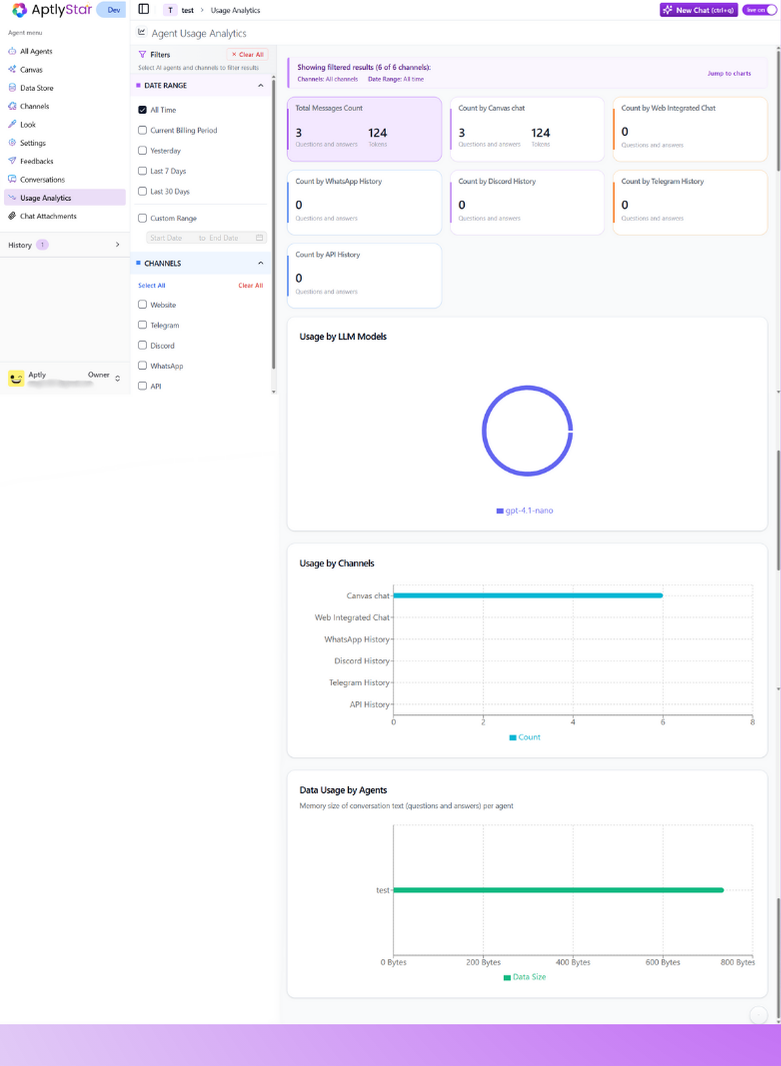
The **Usage Analytics** section gives you a breakdown of how your AI agent is being used across different channels and platforms. It helps you monitor engagement, identify high-traffic sources, and make informed decisions about where to focus improvements or expansion.
This page shows the total number of **questions asked** and **answers delivered** by your agent, grouped by the source of interaction.
***
## 📊 Available Analytics Categories
Each card on this page tracks a specific usage type:
* **Playground Message**: Interactions from the internal Aptly agent playground.
* **Web History**: Messages exchanged via the embedded widget on your website.
* **WhatsApp History**: Agent usage data from WhatsApp integration.
* **Discord History**: All queries received via your Discord channel.
* **Telegram History**: Logs of messages exchanged through the Telegram agent.
* **API History**: Tracks calls made to your agent via API.
 ***
## 🔍 Why Usage Analytics Matter
Here’s how this page helps you make smarter decisions:
* **Track performance**: Know where your agent is most active.
* **Identify adoption trends**: Compare traction across platforms like Discord vs WhatsApp.
* **Optimize support**: Focus improvements on channels with the most traffic.
* **Monitor effectiveness**: Spot if answers match up to queries across sources.
> Note: Data here reflects only **successful message delivery** — failed interactions aren’t counted.
***
## 🛠️ Enabling Accurate Analytics
To ensure this dashboard collects data:
* Your agent must be **Live** (toggle must be switched on).
* Channels must be properly set up in the [Channels tab](https://docs.aptlystar.ai/ai-bots-console/channels).
* The agent should be actively engaged by users via any of the platforms above.
***
***
## 🔍 Why Usage Analytics Matter
Here’s how this page helps you make smarter decisions:
* **Track performance**: Know where your agent is most active.
* **Identify adoption trends**: Compare traction across platforms like Discord vs WhatsApp.
* **Optimize support**: Focus improvements on channels with the most traffic.
* **Monitor effectiveness**: Spot if answers match up to queries across sources.
> Note: Data here reflects only **successful message delivery** — failed interactions aren’t counted.
***
## 🛠️ Enabling Accurate Analytics
To ensure this dashboard collects data:
* Your agent must be **Live** (toggle must be switched on).
* Channels must be properly set up in the [Channels tab](https://docs.aptlystar.ai/ai-bots-console/channels).
* The agent should be actively engaged by users via any of the platforms above.
***